Most agent tools help you start more work. VIDA helps your team stay accountable for it: it runs your backlog as parallel coding-agent tasks, each on its own branch, by default keeps finished work waiting for a person to read and land, and moves main only on your word. When work lands, it tells you in plain sentences what changed and why.
Alpha. Runs on your own machine today, with your own model sign-in. Built on Windows; the HUD needs a Chromium-based browser.
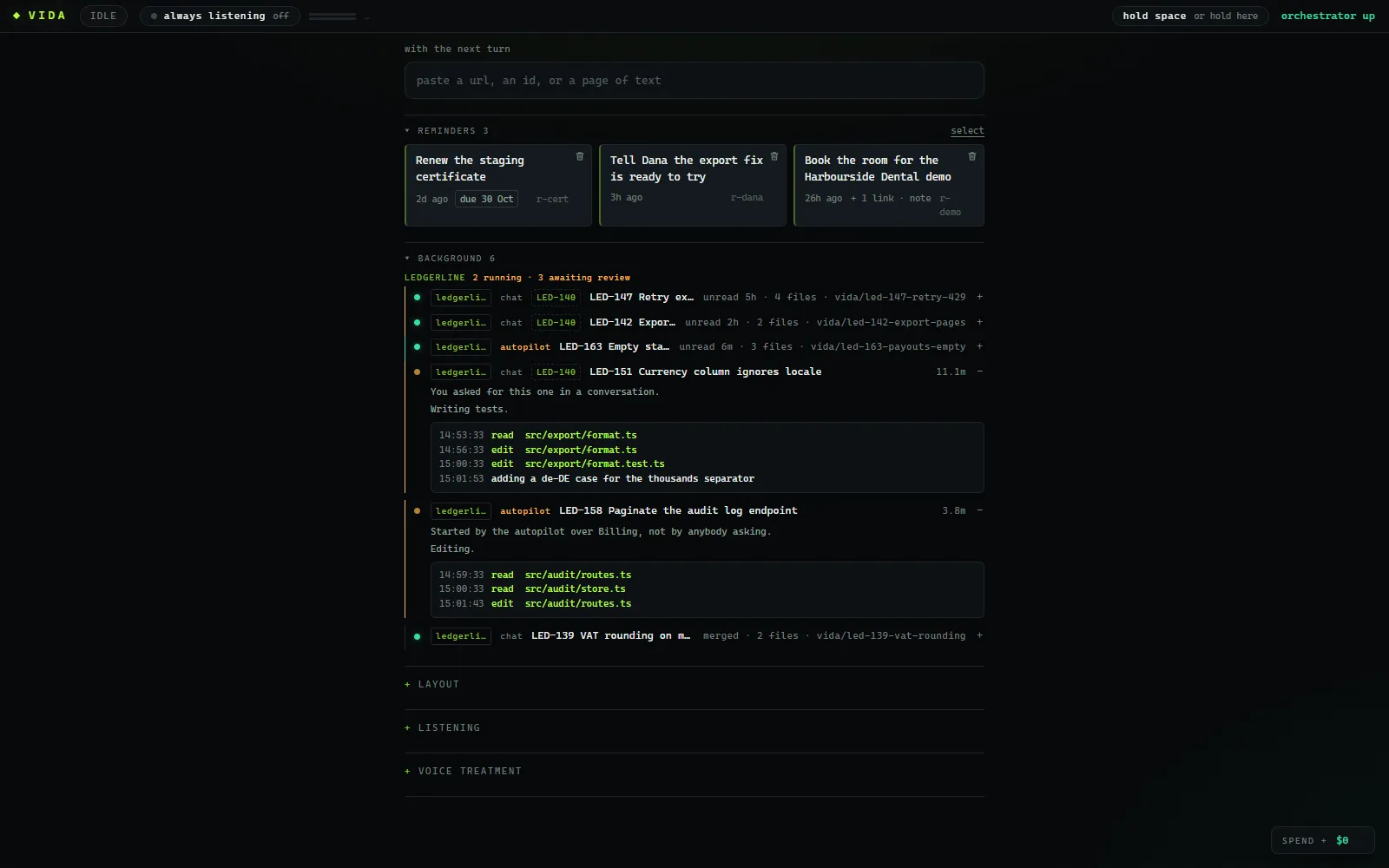
An example of VIDA at work. The developer says: "VIDA, pick up the three bugs under LED-140." VIDA answers: "Starting three tasks, one branch each. I'll tell you when they're ready to read." Three tasks start, each on its own branch: LED-147, Retry exhausts on 429 from the bank; LED-142, Export drops rows after a page break; LED-151, Currency column ignores locale. When LED-147's tests pass it moves to needs review, and VIDA says: "The bank retry fix is ready to read. Nothing lands until you have."
VIDAspeakingkestrel-labs / ledgerline
you"VIDA, pick up the three bugs under LED-140."
vidaStarting three tasks, one branch each. I'll tell you when they're ready to read.
vidaThe bank retry fix is ready to read. Nothing lands until you have.
LED-147needs review
Retry exhausts on 429 from the bank
↳vida/led-147-retry-429
rebased onto dev
14/14
LED-142running
Export drops rows after a page break
↳vida/led-142-export-pages
running tests
6/11
LED-151running
Currency column ignores locale
↳vida/led-151-currency-locale
writing tests
-
Ready to read
LED-147 · Retry exhausts on 429 from the bank
4 files · +30 −2 · tests 14/14 · on top of dev
▣ Lands when someone has read it
2 running1 needs reviewmain moves on your wordone branch per taskLED-147 on top of devlands when a person saysLED-151 writing testsevery landing one revert awayspec signed and frozen2 running1 needs reviewmain moves on your wordone branch per taskLED-147 on top of devlands when a person saysLED-151 writing testsevery landing one revert awayspec signed and frozen
01 The trade-off
A small team can now start more work in a morning than it can read in a week.
The risk is not bad code. It is that six weeks later nobody on the team can say what is in main, or why.
VIDA takes the starting off your hands and keeps the reading in them. More runs at once; nothing lands faster than your team can follow.
montuewedthufri
you
LED-139reviewLED-147
dev 2
standupLED-142LED-151
dev 3
LED-158reviewLED-160
dev 4
supportLED-163
you
LED-139LED-147LED-142LED-151
dev 2
LED-158LED-160LED-163LED-165
dev 3
LED-166LED-168LED-170LED-171
dev 4
LED-172LED-174LED-175LED-177
the team alonethe same team, with VIDA
one task at a time a task on its own branch a person reads it before it landsAn illustration of one week, not a benchmark.
Without VIDA, each of the four people works on one issue at a time, between meetings and reviews. With VIDA, each of them has several tasks running at once on separate branches, and every task stops for a person to read it before it lands.
1branch per task
Each task is a coding-agent session in its own git worktree. Five at once never touch each other, or your checkout.
0moves of main without your word
Finished work waits on its branch for a person to read it; landing on dev unread is opt-in, per task. Main moves only when someone says "promote".
1revert to take a landing back
Each task lands on dev as one merge commit carrying its patch note, so taking it back out is one revert of the whole task.
02 How the work moves
One sentence in. A reviewed merge out. Scroll to follow it.
The same six steps every time, with a person at each gate that matters. The workflow pagegoes through each one in detail.
01 / 06
Say it
Hold space and talk, or switch on always listening and say "VIDA". You get a short spoken answer, and anything worth reading goes on screen.
"VIDA, pick up the three export bugs in Billing."
02 / 06
From the tracker
A task can start from an issue key. The issue becomes the brief, moves to in progress when the task starts, and to done when its work lands.
"Start LED-142, LED-147 and LED-151."
03 / 06
Parallel tasks
Each task is a coding-agent session in a git worktree and branch of its own, so several run side by side without touching each other or your checkout.
"How are those going?"
04 / 06
Review
Finished is not merged. Done-and-unmerged work waits under "needs review", longest-waiting first, until somebody reads it.
"Walk me through the retry change."
05 / 06
Land on dev
Everything lands on a dev branch, as one --no-ff merge per task. Merge as it stands, or put it through a merge queue that rebases, builds and tests it first, one task at a time, so two changes that each pass on their own cannot break dev together.
"Land the retry fix."
06 / 06
Promote, when you say
Main only ever receives. It moves for one reason: a person said, out loud, to promote. So main is always a commit a person chose to promote.
"What's waiting to go to main? ... OK, promote it."
Promote, when you say06 / 06
you "pick up the three bugs under LED-140"
LED-147 in progressLED-142 in progressLED-151 in progress
Finished, unmerged work gathered under "needs review", longest-waiting first, above the tasks still running and their live feeds.
03 The review gate
Nothing lands because an agent said it was done.
Two gates only a person opens: landing on dev, unless you opted that task into self-landing, and promoting to main. Try the first one: this demo keeps the merge locked until every hunk has been read. In VIDA itself nothing counts the hunks you read; a finished task simply waits, unmerged, until a person says to land it, and the review tab has no merge button to press by accident.
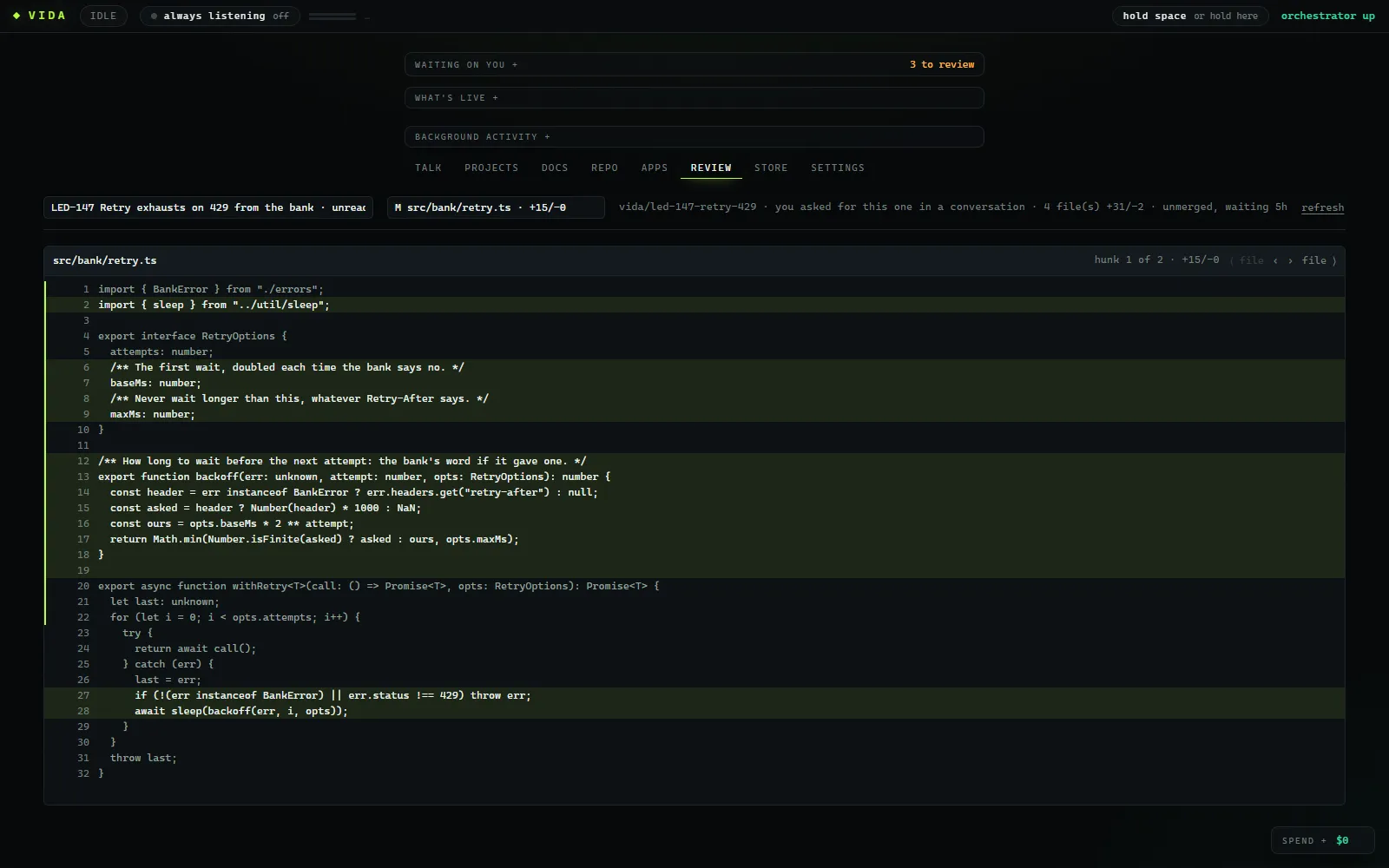
LED-147 Retry exhausts on 429 from the bank
vida/led-147-retry-429on top of devtests 14/14
src/bank/retry.ts @@ 1,6 +1,10 @@
 import { BankError } from "./errors";
+import { sleep } from "../util/sleep";

 export interface RetryOptions {
   attempts: number;
+  /** The first wait, doubled each time the bank says no. */
+  baseMs: number;
+  /** Never wait longer than this, whatever Retry-After says. */
+  maxMs: number;
 }
vida First the options: a starting wait and a ceiling, so a long Retry-After cannot stall the nightly sync.
vida The bank client sets it up: five attempts, starting at half a second, never waiting past thirty.
src/bank/retry.test.ts @@ +5,9 @@ new file
+test("honours Retry-After when the bank sends one", () => {
+ const err = rateLimited({ "retry-after": "4" });
+ assert.equal(backoff(err, 0, { attempts: 5, baseMs: 500, maxMs: 30_000 }), 4000);
+});
++test("doubles its own wait otherwise, up to the cap", () => {
+ const err = rateLimited({});
+ assert.equal(backoff(err, 3, { attempts: 5, baseMs: 500, maxMs: 3000 }), 3000);
+});
vida A test for each path: the bank's Retry-After is honoured, and our own wait stops at the ceiling.
docs/bank-sync.md @@ 3,1 +3,2 @@
-Runs nightly at 02:00 and retries three times.
+Runs nightly at 02:00. On a 429 it waits for the bank's Retry-After,
+or doubles its own wait from 500 ms, up to 30 s, five attempts in all.
vida Last, the sync doc says what it does now, so the next person does not have to read the code to find out.
0 of 6 hunks read. Landing stays locked until all of it has been.
Merged into dev, --no-ff, one commit you can revert
patch note
what The bank sync backs off on a 429 instead of giving up.
why Nightly sync gave up after three instant retries whenever the bank rate-limited it.
main unchanged, until someone says "promote"
01Done is not merged
A finished task waits under "needs review", longest-waiting first, until somebody reads it.
02Reviewed against now
A task rebases onto the current dev before it reports done, so you read what will actually merge.
03Dev before main
Each task lands on dev as one --no-ff merge. Through the merge queue, it is rebased, built and tested first.
04Main on your word
Main fast-forwards to dev only when a person says so. If it has diverged, VIDA refuses rather than forcing it.
05No override
Self-landing is opt-in, needs green build and tests, and refuses any change to a sensitive path, including auth, secrets, crypto, key files, .env, CI, tool policy and the landing machinery itself.
The real review tab
A finished task read file by file, each file whole with the lines it changed lit up, stepping hunk to hunk. Landing it stays a thing you say.
Built for the people who will still be there when the code breaks.
Team lead
The backlog grows faster than the team, and the next hire is six months away.
With VIDA
Say "pick up the three export bugs" and three tasks start, each on its own branch, with the issues moved to in progress in your tracker.
Ask "what's waiting on me?" and hear it in one breath: what needs review, what has sat longest, what is fine.
Land the reviewed work through a merge queue that rebases, builds and tests each task before it merges.
Founder-engineer
You write the code, and also sell, hire and answer support. Your hours are the limit.
With VIDA
Point the autopilot at a project in your issue tracker. It works the open issues and screens out anything security-sensitive, destructive or too big.
It stops by itself after three landings or about 25 changed files and asks you to read, so it is never more than one sitting ahead of you.
Come back from a meeting to a short account of what finished, what landed and what is waiting on you.
The dev who owns it
When this breaks at 2am it will be your problem, so you want to have read it first.
With VIDA
The review tab opens every file a task touched, whole, with its lines lit, and steps through it change by change.
Ask "walk me through the retry change" and VIDA explains it from the same view you are reading.
Every landing carries a patch note in its merge commit (what changed, why, what you will notice) and is one revert away.
05 Plain speech, both ways
Talk to steer. Hear back in sentences, not a diff stat.
Hold space and talk, or turn on always listening and say "VIDA". Typing works too. What comes back is built to be heard while you are looking at something else.
Speech-to-text is the browser's own, so the HUD needs a Chromium-based browser, and while you talk that browser's speech service hears it. Always listening is off until you turn it on. What is sent where.
Press and hold, then let go. Or keep it focused and hold space.
youHow are those three going?
vidaTwo are done and waiting for review. The locale one is still writing tests.
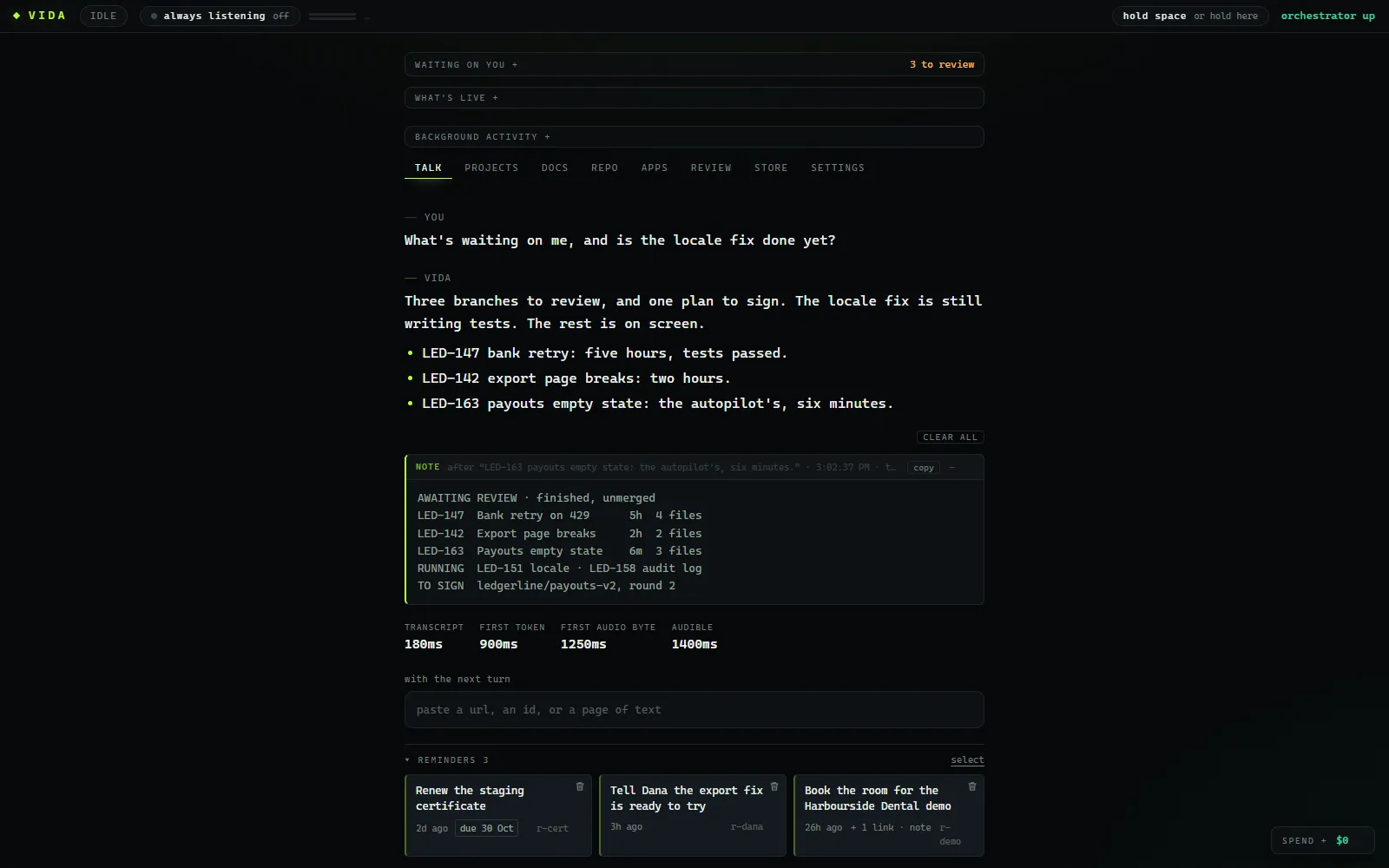
You are halfway through a diff and ask, "What's waiting on me?" Two ways to hear back:
A chat reply, read aloudhalf a minute, still on branch two
Sure! I checked the repository and the task list. There are currently three branches awaiting review.
The first is vida slash L-E-D dash one four seven dash retry dash four two nine. It was last updated about five hours ago and changes four files.
The second is vida slash L-E-D dash one four two dash export dash pages, from about two hours ago, which changes two files. The third…
VIDAabout seven seconds
Heard
"Three branches to review, and one plan to sign. The retry fix has waited longest, about five hours."
On screen, to read when you look up
AWAITING REVIEW - 3 finished, unmerged and not in the merge queue:
  >> "Retry exhausts on 429" (led-147) on vida/led-147-retry-429, 5 hours ago, 4 file(s)
  >> "Export drops rows" (led-142) on vida/led-142-export-pages, 2 hours ago, 2 file(s)
     "Empty payouts state" (led-163) on vida/led-163-payouts-empty, 6 minutes ago, 3 file(s)
SIGN-OFF - plan invoice-export: current, no open discoveries
With VIDA you have the answer before your eyes leave the diff, and the branch names are on screen to read and copy instead of being spelled out at you. Every spoken reply works this way: the answer in the first sentence, about three sentences at most, and anything meant to be read (ids, lists, numbers, code) put on screen.
Expand screenshot: Talk viewExpand ⤢Talk viewA short spoken answer, with the detail in an aside on screen: the list, the ids, the numbers. Reminders sit under the conversation.
Read it, then land it
you
Walk me through the retry change.
vida
It only retries a 429 now. It waits as long as the bank's Retry-After asks, otherwise doubles its own wait up to thirty seconds, five attempts in all. Four files, six changes; the review tab has the first open.
Landed on dev as one merge. LED-147 is marked done in the tracker.
merge 4e1c9a2 Merge vida/led-147-retry-429 (--no-ff) into dev
Health check, filed as issues
you
Run a health check on the Ledgerline repos and file anything serious.
vida
Done. Two high findings are filed in the Repo Health project. One looks like a live token in a test fixture.
ledgerline-api high secrets.tokens test/fixtures/bank.json:12 sk_l… (40 chars) -> LED-180ledgerline-web high loss.unpushed branch feature/dark-mode, 9 commits, 23 days -> LED-181ledgerline-web low hygiene.readme no setup section (not filed)read only: no fetch, no hooks, no installs
It keeps its word, too: "I'll look into that" is written down, and when the work finishes VIDA tells you, even if that means speaking first, though never over someone talking, and never more than once in thirty seconds. More exchanges are on the use cases page.
06 Spec-driven, with SynthKit
For bigger changes: freeze the spec, then let the work run against it.
VIDA runs larger changes through SynthKit, our spec-driven architecture for autonomous software engineering, built by the same team. The spec is agreed and signed before any code is written, and it holds still while the work is in flight.
The two divide the reading. SynthKit narrows what needs a person: you review the spec once, every task is checked against it, and only what its rules flag stops for you. VIDA keeps the rest of the gate: the plan reaches dev only when a person finishes it, and main only on a person's word.
01
Write the spec
Start a plan from a sentence and shape it in design rounds: what each task must build, and what each part promises the rest. Today a person and a model write it together. Nothing runs yet.
02
Sign it, and it freezes
A person signs it on the plan card with their SSH key, typing its passphrase there; VIDA cannot sign for you. From then on the spec holds still. Edit a brief, or have an agent report it cannot be built as written, and nothing new starts until the spec is amended and signed again.
03
Run it in parallel, under a budget
Execute prices the run with a dry run and spends nothing until you confirm. Tasks then run side by side, each on its own branch, in dependency order, under the cap you set.
04
Drift does not land
Each finished task is checked against the signed spec. Work outside its scope or beyond its contract is sent back for another round, held for a person, or stops the plan for redesign. It never merges quietly.
05
Review what the rules flag
Each task that passes merges onto the plan's own branch. One that the review rules flag stops the run until a person approves it or sends it back.
06
Dev, then main
When you press Finish plan, the whole plan lands on dev as one merge you can revert. Main moves only when a person says promote.
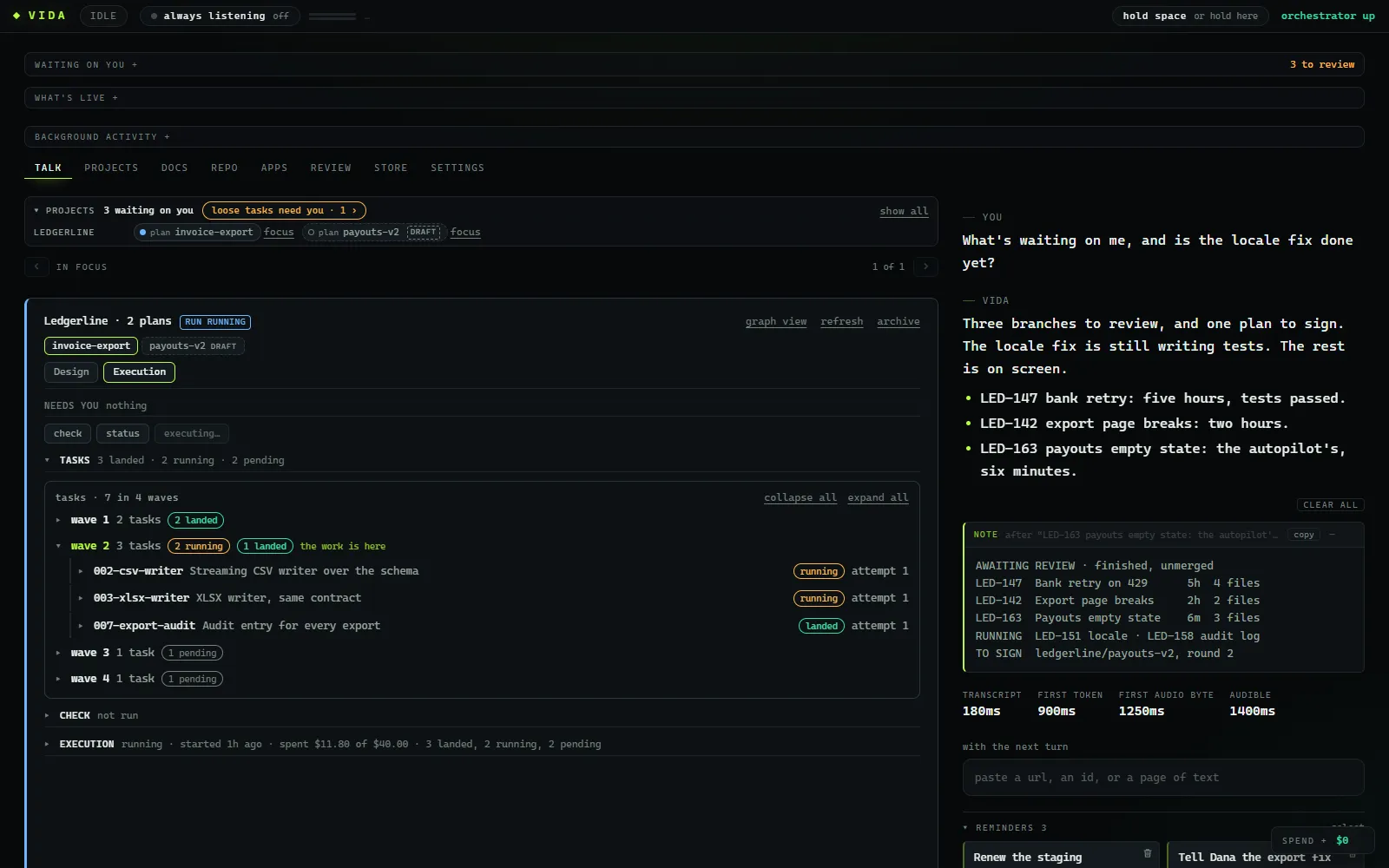
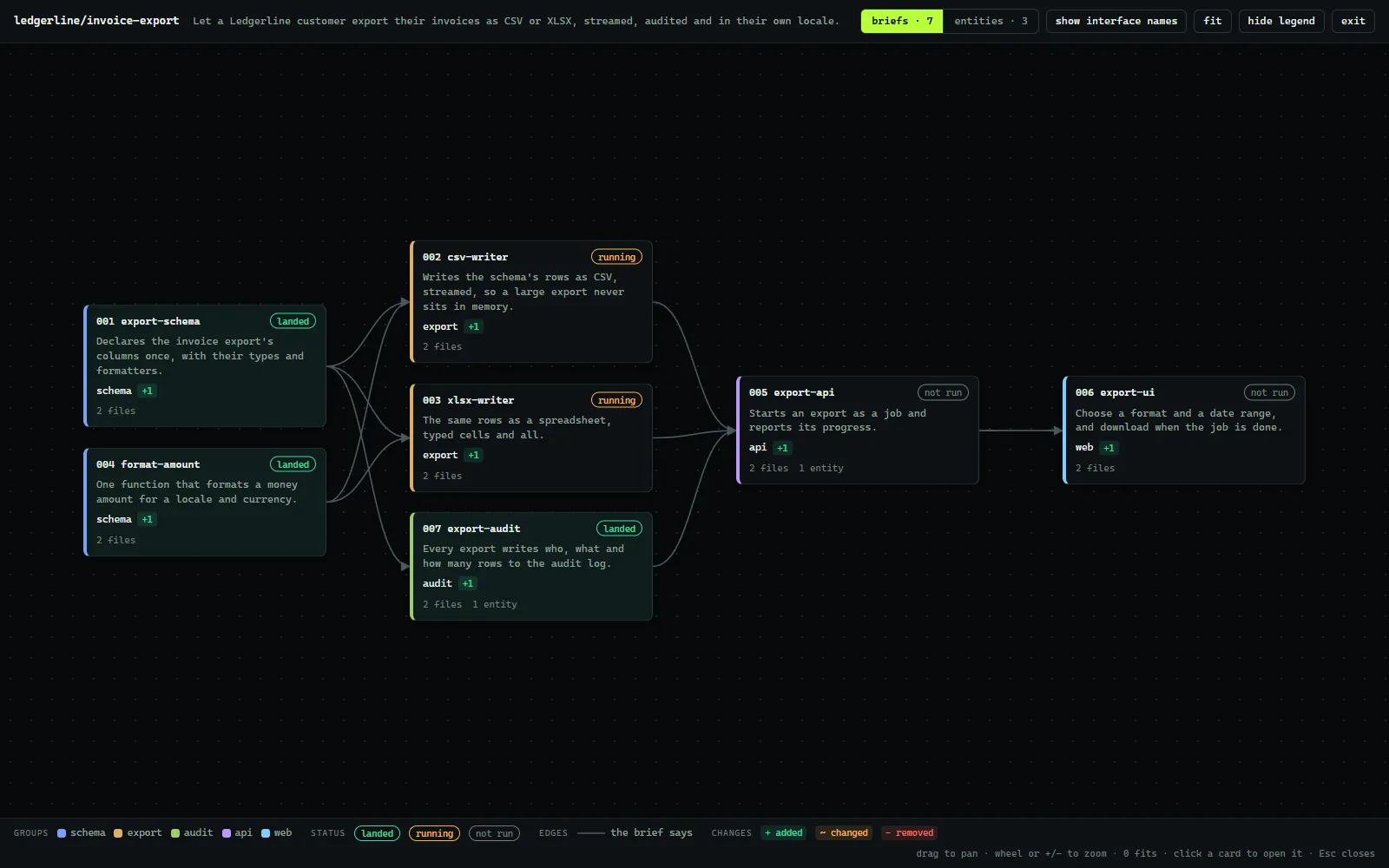
Plan card A signed SynthKit plan on its card: the budget, and each task grouped by dependency wave with its state, from landed to running to pending.Graph view The whole plan as one graph: each brief, what it depends on and which modules it changes, before anything runs.
Issues become briefs, briefs become tasks, and the tracker moves as the work does. Ideas worth keeping are filed as issues under their project, so there is one backlog, not two. VIDA fits around the tools your team already has.
Your issue tracker
Start a task from an issue key; the issue becomes the brief and moves as the work does. Read and write are separate grants, and VIDA never deletes or archives anything.
git and your repo host
A dev branch where everything lands, a main that only receives, merges you can revert, and pushes of dev that are never forced. VIDA holds no credential.
Your coding agent
Tasks run on a coding-agent CLI with its own sign-in and model. Pick a model per task, or set a standing choice.
SynthKit plans
Bigger changes as signed plans: designed in rounds, signed with your SSH key in the HUD, run in dependency waves under a budget cap, and landed on dev as one merge.
08 Your models, your infrastructure
Any model provider. Managed, or on your own servers.
Where VIDA is going, next to what is true today. The planned parts are not built yet, and how each is packaged and priced is not decided; alpha teams will shape both.
planned
Bring your own model
Use your own key for Claude, OpenAI or Google, or connect an on-prem or self-hosted model. Mix them however suits your team.
Today The conversation runs on Claude and tasks run on the Claude Code CLI, under your own sign-in and billing. Every model already sits behind one adapter, so each new provider is an adapter, not a rewrite.
planned
Managed service
We run VIDA for your team. You connect your repositories, tracker and models, and get to work.
Today Nothing is hosted by us. VIDA runs on each developer's own workstation.
planned
Self-hosted
Deploy VIDA yourself, inside your own network, next to your code and your own models.
Today It already runs entirely on your machine, and your code reaches only the models you configure.
01How is this different from other tools that run agents in parallel?
Running agents side by side, each in its own worktree, is where every tool in this space starts, and VIDA does it too. What VIDA adds is accountability for the result: a review gate that holds finished work until a person reads it and says to land it, a main branch that moves only on a person's word, signed and frozen specs that every plan task is checked against, a repo health sweep filed to your tracker, and answers spoken in a sentence while your eyes stay on the code. It is built and run day to day on Windows.
02Does VIDA write the code?
No. A coding agent does, through its own CLI and sign-in. VIDA decides what runs where, keeps track of it, and puts the decisions that need a person in front of one.
03Can it merge to main by itself?
No. The autopilot and self-landing can only ever land on dev, and only under the rules above. Main moves when a person explicitly says to promote.
04Where does it run, and who sees our code?
Today, on a developer's own workstation: a local orchestrator and a HUD in the browser. Nothing is hosted by us, and your code reaches only the models you configure. A managed service and a self-hosted deployment are both planned.
05Which models does it work with?
Today, the ones named under "Your models" above. Where it is going: any provider, with your own key, or a model you host yourself. Every model already sits behind one adapter, so a new provider is an adapter, not a rewrite.
06What is SynthKit, and do I need it?
SynthKit is our spec-driven architecture for autonomous software engineering, from the same team. VIDA uses it for bigger changes: a signed, frozen spec, run as parallel tasks that are checked against it. A small change needs no plan; a sentence or an issue key starts a task.
07Is it built for a whole team?
Today one install is one developer's assistant, so each person runs their own against the shared repositories and tracker. Shared installs with several sign-ins are planned for the beta.
08Do I have to talk to it?
No. Every turn can be typed. Voice is there because it lets you steer while your eyes stay on the diff.
09What does it cost?
The alpha is free: there is no charge from us while it runs. Tasks run on your own model account, so you see that spend where you already do, and plans run under a budget cap you set. Pricing past the alpha is not decided.
10 The road
Alpha now. Then beta, then general availability.
Each stage builds on the last. Everything past the alpha is planned, not built, and there are no dates yet.
Alpha now
A few teams, working with us
Installed on each developer's workstation, with the models it supports today. What alpha teams run into decides what comes next.
Parallel tasks and the review gate
Voice and typed turns
Tracker issues as briefs, and the autopilot
Signed SynthKit specs, run in parallel
Beta planned
Your models, your whole team
Open past the alpha teams, and past one developer per install.
Bring your own key for the major model providers
Shared installs with several sign-ins
More issue trackers and repo hosts
A first self-hosted deployment
General availability planned
Managed or self-hosted, both supported
Offered both ways for the long term. How each is packaged, priced and supported is not decided yet.
A managed service
A supported self-hosted deployment
On-prem and self-hosted models
A desktop app with a global push-to-talk key
Ready when you are
Run more of the backlog at once.Keep reading every change.